# Welcome to Habrok Documentation
## About
Habrok (named after [Hábrók](https://en.wikipedia.org/wiki/H%C3%A1br%C3%B3k)) is a Discord bot useful for staff members to identify how appreciated or toxic someone is in your community.
## Quick links
{% content-ref url="/pages/EJRUvyiGKhkQYFxnXoiv" %}
[Adding the bot](/overview/adding-the-bot)
{% endcontent-ref %}
{% content-ref url="/pages/Z4I728xok5AXmM5FuYFf" %}
[Support Server](/overview/support-server)
{% endcontent-ref %}
# Adding the bot
## Adding the bot in your server
[Click here](https://invite.habrok.app) to add the bot in your server
## Permissions
* "Manage Roles": This is required to assign roles to your guild members
* "View Audit Log": This is currently used for checking who invited the bot, and will later be used for automation and advanced reputation calculation
* "Read Messages": This allows the bot to see the channels to later allow for a logging channel. The bot **cannot** read messages.
* "Send Messages": This allows the bot to answer to commands.
* "Use Application Commands": This allows the bot to register commands (both slash and context menu)
# Support Server
## Support server link
You can join the support server by [clicking here](https://support.habrok.app).
Don't forget to select "Habrok" in the onboarding modal:
# Warnings
{% hint style="danger" %}
Be careful when you set the rewards. Some communities are more prone to alt accounts, so don't give out important permissions.
{% endhint %}
{% hint style="warning" %}
When setting the rewards, make sure the bot's role is **above** the rewarded roles in the server's role list. Otherwise the bot will not be able to give them out.
{% endhint %}
{% hint style="info" %}
When you set or update rewards, the changes are not directly applied to your server's members. However, when a member uses the `/check-reputation` command, they are recalculated.
{% endhint %}
# Configuring the bot
/config command
## Permission
This command is available to Administrators only.
## Purpose
This commands allows you to check the current server configuration, checking the sharing setting and the role rewards.
### Sharing reputation
Reputation is shared by default. It allows staff to see the user's reputation in other servers.
You can disable it by clicking the "Change sharing setting" button, which will isolate your server.
### Rewards
Those are the rewards set for your server, more details in [Setting a reward](/admin-features/setting-a-reward)
## Example
# Setting a reward
/set-reward command
## Permission
This command is available to Administrators only.
## Purpose
This commands allows you to set a reward to users whose reputation exceed a certain score.
## Arguments
### role
This is the role that will be set to the community member.
### score-needed
The score that the user needs to earn the role.
{% hint style="danger" %}
To avoid abuse, you cannot set a reward to a negative score. The bot is not intented to be used as an automoderator.
{% endhint %}
### score-before-rescind
This is the score under which the role will be removed. This is used as a buffer to avoid a role being added to and removed from a member too quickly.
{% hint style="warning" %}
The "score-before-rescind" must be lower than or equal to "score-needed".
{% endhint %}
{% hint style="info" %}
Since a role can only be rewarded once, you can edit a reward by running the command a second time with the same role.
{% endhint %}
## Example
# removing a reward
/remove-reward command
## Permission
This command is available to Administrators only.
## Purpose
This commands allows you to remove a reward.
## Arguments
### role
This is the role currently given as the reward you wish to remove.
{% hint style="warning" %}
This command will neither delete the role nor remove it from your server members.
{% endhint %}
## Example
# Giving to or removing a reward from a member
/override-reward command
## Permission
This command is available to members with the permission "Manage Messages".
## Purpose
This commands allows you to manually give a reward to a server member, or to deny it so they never have access to the reward.
## Arguments
### role
The role associated to the reward you wish to give to the user
### action
This is either `GIVE` `DENY` or `RESET`.
* `GIVE`: manually gives the reward
* `DENY`: prevents the member to ever getting the reward (and removes it if the user already has it)
* `RESET`: removed the manual override, the reward reset is recalculated using the reputation score only
## Example
# Checking a member's reputation
/check-member-reputation command and check-reputation context menu
## Permission
This command is available to members with the permission "Manage Messages".
## Purpose
This commands allows you to check a member's reputation score.
{% hint style="info" %}
The detailed view shows "++" or "--" when the person who rated the community member is a staff member
{% endhint %}
## Arguments
### user
The member whose reputation score you wish to check.
## Example
# Checking your reputation score
## Permission
This command is available to everyone, although staff members (with the "Manage Messages" permission) will have more details.
## Purpose
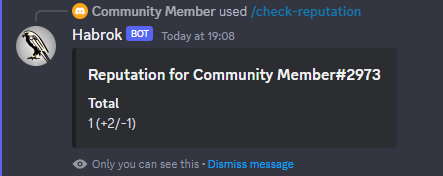
This commands allows you to check your current reputation score.
## Example